Training
Daily check-in & readiness
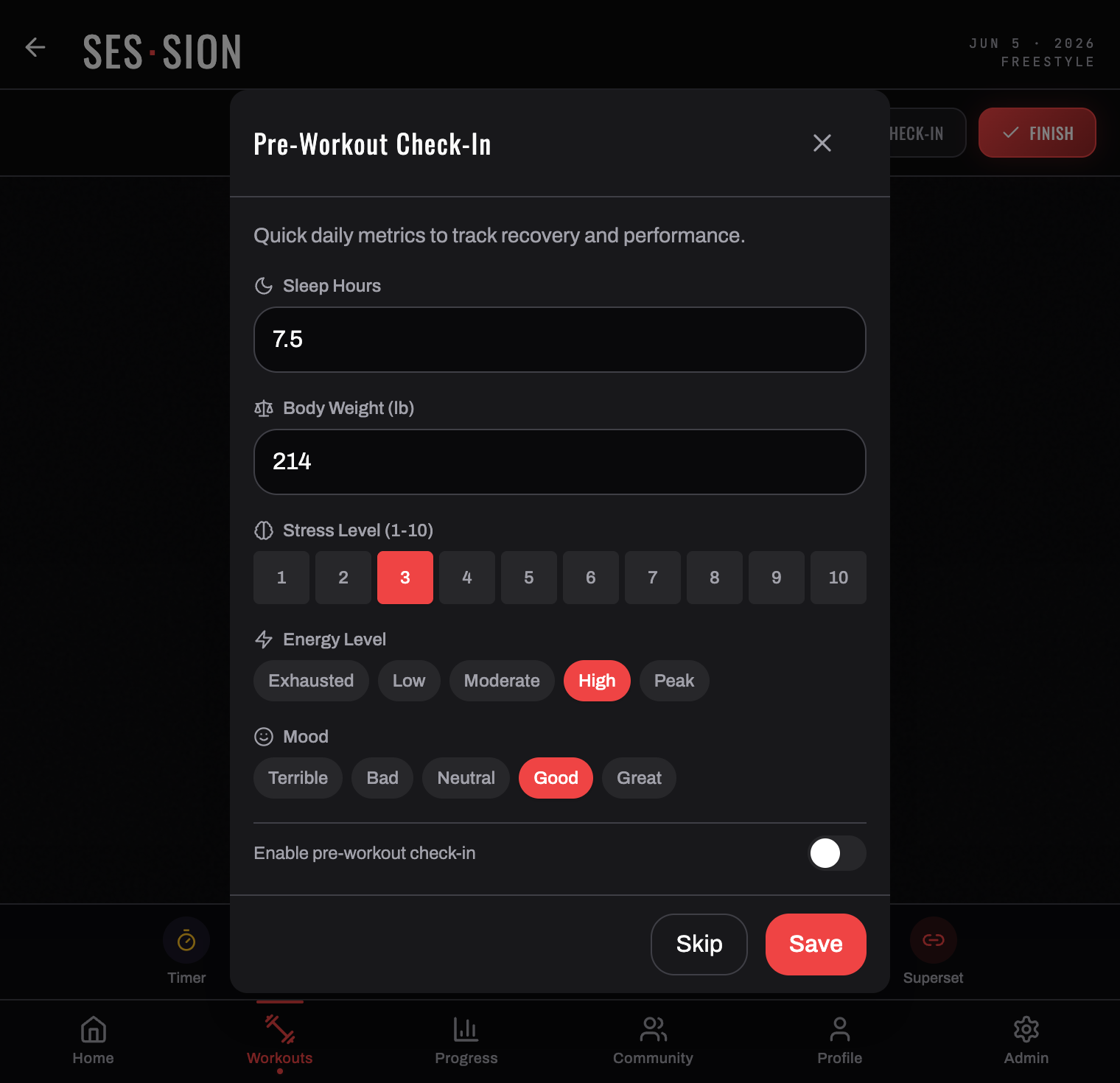
The daily check-in captures the subjective signals a device can't measure. On its own it's enough to produce a readiness score; alongside a connected wearable it sharpens one.
Where to find it
It's at the top of the SES·SION logger — either the DAILY CHECK-IN button in the session header, or the LOG CHECK-IN card that appears above your exercises. DISMISS hides the card for that session if you'd rather just train.
What it asks
Five short sections, and only the first four matter:
| § 01 Sleep · hours | How long you slept — 7.5 |
| § 02 Stress | A 1–10 scale |
| § 03 Energy | Exhausted · Low · Moderate · High · Peak |
| § 04 Mood | Terrible · Bad · Neutral · Good · Great |
| § 05 Bodyweight | Optional — a weigh-in, if you're tracking it |
That's it — short by design, about twenty seconds. On mobile, if you've connected a wearable, your sleep hours are auto-filled from last night's data — the time you were actually asleep, not the time in bed; you can override the value and your edit wins.
Muscle soreness isn't on the daily check-in — you rate that per exercise during a session, where it's more precise.
What it changes
Submitting the check-in fills in § 01 Readiness on your home screen straight away. A screen that read "NO RECENT DATA — log a check-in to see readiness" becomes a score with a plain-language verdict — for example 85%, "YOU'RE WELL RECOVERED — green light to push hard today."
It counts even when you have a wearable: on a morning with no watch data for last night, today's check-in sets today's score, captioned FROM TODAY'S CHECK-IN. Change your answers and the score updates; delete the check-in and the card goes back to what it showed before.
Your bodyweight entry also feeds the bodyweight trend, and your sleep, stress, energy, and mood become the wellness trends in Progress & insights.
Check-in or wearable?
Both feed readiness, and you don't need both:
- Check-in only — readiness is computed from what you reported today. This works on day one and needs no hardware. On a day you haven't checked in, the card says so and shows your last check-in with its day — an older check-in is never presented as today's score.
- Wearable connected — readiness is computed from last night's objective signals: time asleep, heart-rate variability (HRV), and resting heart rate, each measured against that device's own rolling baseline. If there's no reading for last night, the card says so rather than re-showing an older night; if your device recorded only sleep, you see the sleep but no percentage. See Connect a wearable.
With neither, there's no readiness score at all — BurnGauge shows you the two ways to supply one rather than inventing a number.
Related: Your home screen · Progress & insights.
Turn your workouts into intelligence
Log your lifts, follow a program, and let BurnGauge surface what's working. Free to start — upgrade to Pro for the full analytics + AI coaching stack.