Integrations & Setup
Connect a wearable
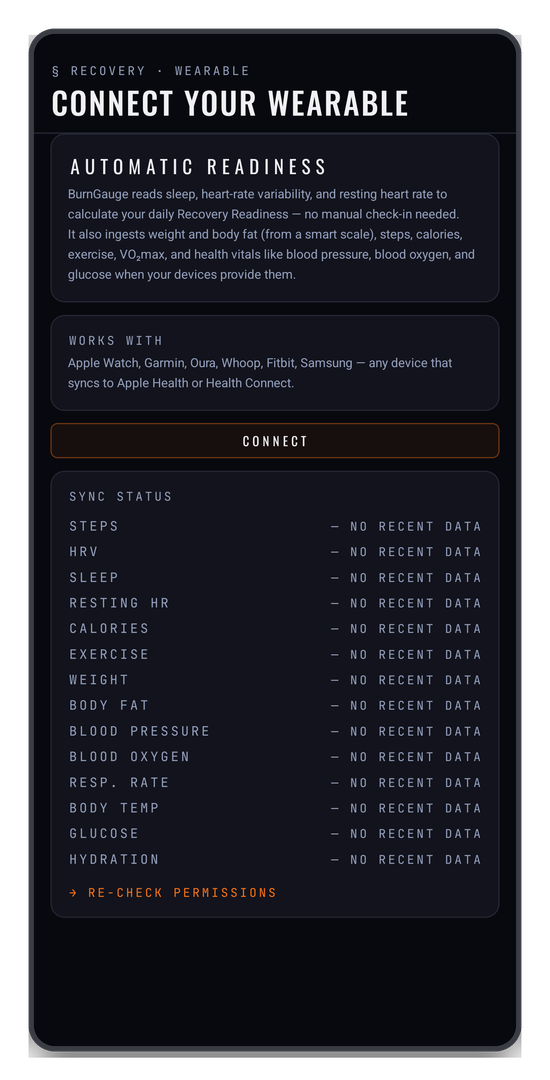
Connecting a wearable lets BurnGauge compute your recovery readiness from objective data rather than from how you felt when you filled in the check-in.
It reads — read-only — your sleep, heart-rate variability (HRV), resting heart rate, steps, calories, exercise, and VO₂max, plus weight and body fat from a smart scale. Where your devices provide them it also ingests health vitals such as blood pressure, blood oxygen, and glucose.
Which hub
BurnGauge connects through your phone's health hub, not a vendor cloud:
- iOS → Apple HealthKit
- Android → Health Connect (install it from the Play Store if your phone doesn't have it)
That means it works with Apple Watch, Garmin, Oura, Whoop, Fitbit, Samsung — any device that syncs into Apple Health or Health Connect. Make sure your watch or ring is already feeding that hub before you connect.
Connect it
- In the mobile app, open Connect a wearable — from onboarding, the readiness card on your home screen, or Settings.
- Tap CONNECT and grant the requested read permissions.
- On Android, if Health Connect isn't installed, use the one-tap install link, then return and grant access.
BurnGauge does a one-time 30-day backfill on connect so your baseline forms immediately, then keeps fresh data flowing in the background.
Checking it's working
The SYNC STATUS list on the same screen prints every metric it tracks — steps, HRV, sleep, resting HR, calories, exercise — with how recently each one arrived. A metric your device doesn't provide reads NO RECENT DATA, so you can tell "not connected" from "connected, but this watch doesn't measure that".
If several metrics are stale at once, the problem is usually between your watch and the health hub rather than between the hub and BurnGauge — check the hub's own app first.
Picking which app feeds which metric
If more than one app writes the same metric into your health hub, MANAGE WEARABLE SOURCES in Settings lets you choose which one BurnGauge listens to per metric — so a phone step-counter doesn't override your watch.
How readiness uses it
Readiness is scored against your own rolling baseline — there's no universal "good" HRV. More precisely, against each device's own history: a night on a sleep pad is never compared with the numbers your watch usually reports, because different sensors measure HRV differently (and iOS and Android HRV are never cross-compared). A device you've just started using spends its first few nights building its baseline.
What BurnGauge reads for a night:
- Sleep is time asleep, not time in bed — the awake stretches your device records during the night are left out, and how much of your time in bed you actually slept (your sleep efficiency) nudges the sleep part of the score.
- HRV is the one measured during that night's sleep, so a reading taken just before midnight counts for the night it belongs to, not the day before.
- One device per night. If two apps both report last night, the one with the most complete night supplies sleep, HRV and resting heart rate together — nothing is mixed across devices. You can still pick a device per measurement in Manage sources.
- Sleep alone is not a score. If your device reports sleep but no HRV or resting heart rate, the card shows your sleep and no percentage.
You do not need a wearable to get a readiness score: the daily check-in produces one on its own. A wearable replaces your subjective report with measured signals, and auto-fills your sleep hours into the check-in.
This is a mobile feature — the web app has no wearable connection.
Related: Daily check-in & readiness · Progress & insights.
Turn your workouts into intelligence
Log your lifts, follow a program, and let BurnGauge surface what's working. Free to start — upgrade to Pro for the full analytics + AI coaching stack.