Training
The workout logger
The SES·SION logger is where you train. It tracks your sets in real time and auto‑saves as you go.
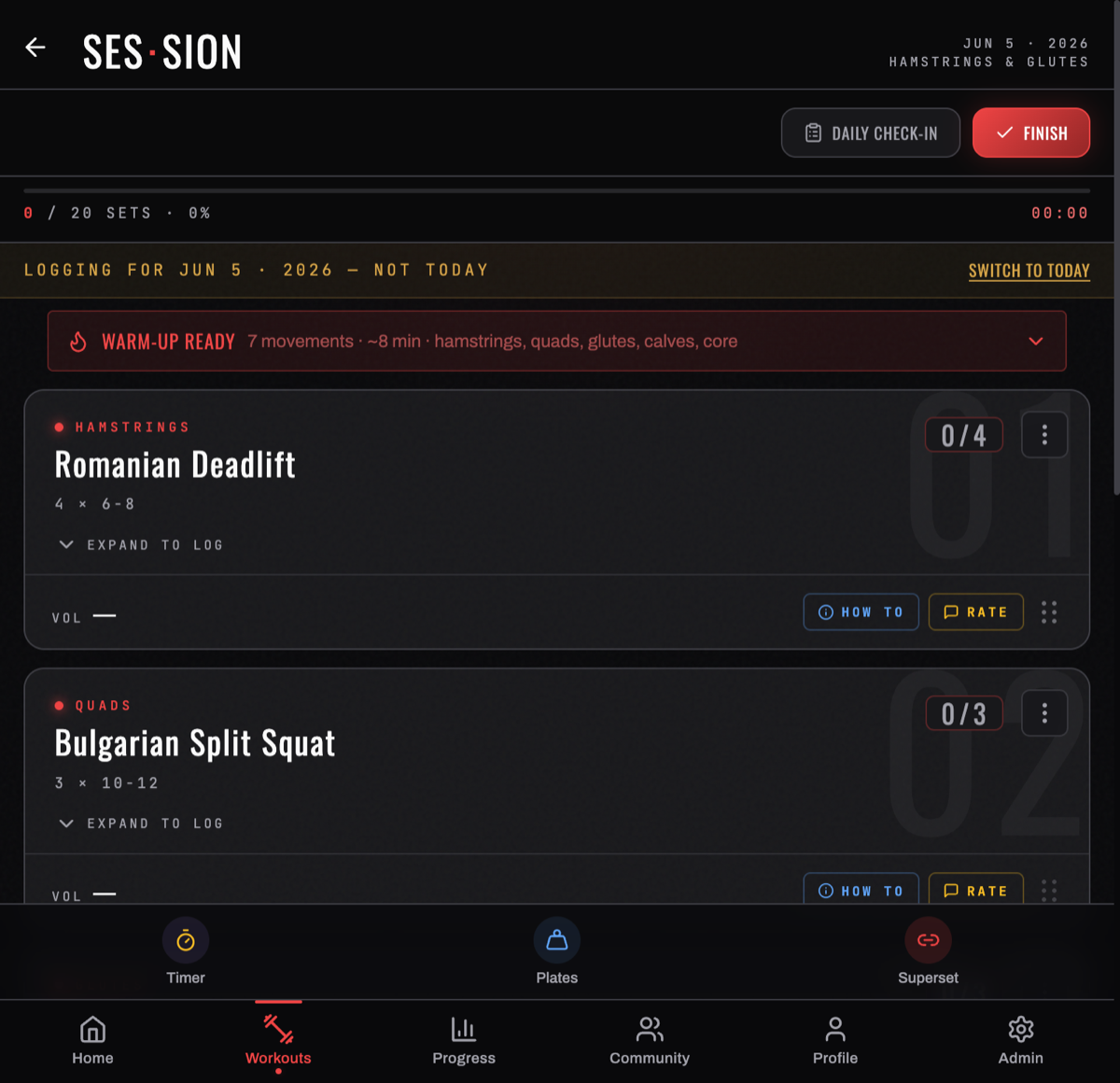
The session header
Across the top you get the date, the day's target muscles, a live set counter + percent (0 / 20 SETS · 0%), a timer, and two actions: DAILY CHECK‑IN (log how you feel — see Daily check‑in) and FINISH. If you opened a day that isn't today, a banner reads "LOGGING FOR … — NOT TODAY" with a SWITCH TO TODAY button.
A WARM‑UP READY banner up top suggests a quick warm‑up ramp for the session.
Logging sets
Tap an exercise's EXPAND TO LOG to open its sets. For each working set enter weight and reps (and RIR — reps in reserve — if you track effort), then tap the checkmark to log it. It saves immediately, advances the set counter, and there's no separate save button. Each exercise shows its target scheme (e.g. 4 × 6‑8).
Sets save to the device first and upload on their own, so a gym with no signal changes nothing about logging.
Reading an exercise row
Once an exercise has logged sets, its row summarises itself without being expanded:
- the muscle group it trains, and COMPLETED once every set is in
- how many SETS it holds
- the VOL that exercise has moved this session, in your weight unit
- HOW TO for the form notes, and RATE to log how it felt
That last pair is the part people miss. RATE captures pump, soreness, effort and joint pain per exercise — which is where soreness lives, rather than on the daily check-in, because it's more precise per movement than per day.
Manage a session's exercises
Every exercise row has an ⋮ "Exercise options" button. Tap it for:
- Swap Exercise — replace this exercise with a different one (keeps its slot). Good when a machine's taken or you want a variation.
- Remove Exercise — drop it from this session.
Add an exercise: tap Add Exercise at the bottom. The exercise index opens — search by name or filter by muscle (ALL / CHEST / BACK / SHOULDERS / ARMS / LEGS / CORE / CARDIO), set the sets × reps scheme, and tap + on any exercise. The muscle‑coverage body shows what your picks train.
Reorder: every row is draggable ("Drag to reorder") — press and hold, then drop to change the order.
Each row also has View exercise instructions (form/how‑to) and Rate this exercise (log pump, soreness, effort, joint pain — your per‑exercise feedback).
Tools
The bottom toolbar carries four, available for the whole session: Timer (rest countdown), Plates (plate-math for a target weight in your unit), Superset (group exercises to log back-to-back), and Help (guidance for this screen).
Finishing
Tap FINISH to complete the session — everything flows into Progress & insights immediately.
Related: Your weekly calendar · The exercise library.
Turn your workouts into intelligence
Log your lifts, follow a program, and let BurnGauge surface what's working. Free to start — upgrade to Pro for the full analytics + AI coaching stack.